RAM
Recording
Altimeter for
Models
by
Randy Brust
Please
visit www.soaringcircuits.com
for the latest information!
FlightView 2.4 is now available for download for those who might be interested in trying it out. This is the software which is used to upload, view, and save flight data from the RAM altimeters. The complete install package is a 5 Meg zip file and includes two sample data files that you can load. The zip file is available here. This install package will work on any Windows XP machine.
A few minor bugs have been taken care of, but the two main changes are the addition of a metric units mode and the ability to select which COM port you want to upload data through. This is useful for those whose computer does not use the typical COM1 port, or for those who want to use a USB adapter which automatically assigns a COM port other than COM1.
For those who want to run the software on a computer with an older version of Windows (such as ME, 98, etc.), you must first install Microsoft's .NET Framework. This is installed by running dotnetfx.exe which is available as a free download from Microsoft at this website. This download is about 20 Meg long. Even if you're not running Windows XP, there is a chance that the .NET Framework has already been installed on your computer as part of a Windows update. You can check by going to the Control Panel and clicking the Add or Remove Programs icon. Scroll through the list of programs and look for Microsoft .NET Framework. If it's there, then you're all set.
Any feedback regarding installing and running FlightView 2.4 on various computers would be greatly appreciated!
Several USB-RS232 adapters have now been tested with RAM altimeters and work great. These adapters allow the RAM to upload flight data to your computer via a USB port instead of the typical serial port. So, why would you want to use a USB port? Well, many of the newer laptop computers do not provide a serial interface and many RAM users want to use their laptops to upload and view their altimeter data right in the field. The adapters are fairly inexpensive and can be had for less than $19.
So far, the following 3 adapters have been tested. The VSCom model USB-COM-CBL is the one I've been using and is available here. The IOGear model GUC232A is available at local Micro Centers or online here. The Belkin model F5U409 is available at local Comp USAs or online here.
FlightView 2.3 is now available for download for those who might be interested in trying it out. This is the software which is used to upload, view, and save flight data from the RAM altimeters. The complete install package is a 5 Meg zip file and includes two sample data files that you can load. The zip file is available here. This install package will work on any Windows XP machine.
For those who want to run the software on a computer with an older version of Windows (such as ME, 98, etc.), you must first install Microsoft's .NET Framework. This is installed by running dotnetfx.exe which is available as a free download from Microsoft at this website. This download is about 20 Meg long. Even if you're not running Windows XP, there is a chance that the .NET Framework has already been installed on your computer as part of a Windows update. You can check by going to the Control Panel and clicking the Add or Remove Programs icon. Scroll through the list of programs and look for Microsoft .NET Framework. If it's there, then you're all set.
Any feedback regarding installing and running FlightView 2.3 on various computers would be greatly appreciated!
The RAM's power supply circuitry has been updated so that it can now be powered by voltages approaching 3.25v. This means it can now run off of a single LiPoly cell!
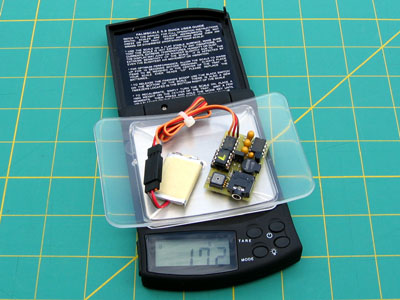
Shown at right is a RAM being run by a 170mAh LiPoly cell. This battery will power the RAM for almost 6 hours. Notice that the complete package weighs less than 18 grams!
Pictured to the right is Cal Posthuma's RAM beta unit that he's been testing. Cal wanted to be able to easily move the altimeter from sailplane to sailplane so he gave it its own small battery and power switch making it a fully self contained package.
The battery he used is a 1/3AAA 150mAh NiMH pack which will run the RAM for about 5 hours. The battery and altimeter are shown wrapped in the breathable foam that will be supplied with each unit. Cal says the entire package weighs 1.2 ounces.
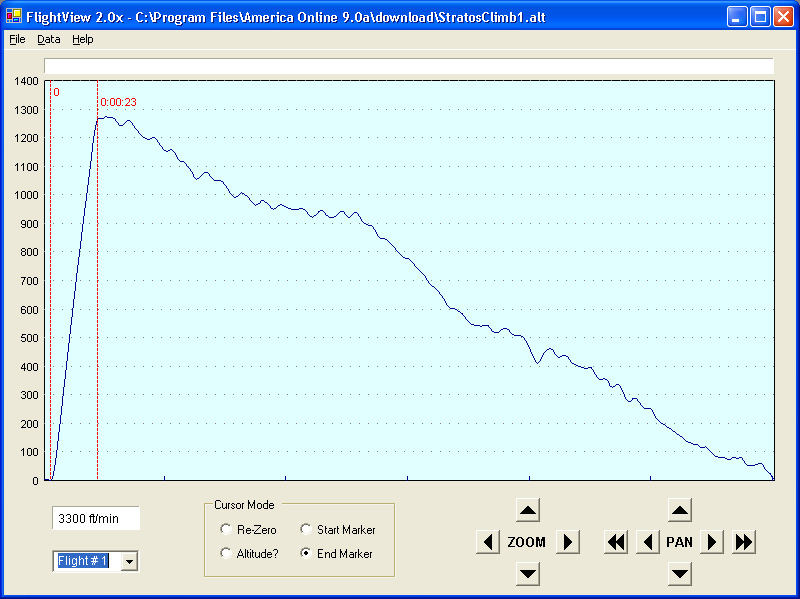
Beta versions of the altimeter are out in the field and being tested right now (thanks guys!). To the right is a plot from Dave Seay's Stratos SL-e electric glider from ShredAir. The particulars are: Hacker B50-9S motor with 6.7:1 gearbox, RFM 17x11 prop, and 16 zapped GP3300 cells. All up weight is 110 ounces. Notice that the Stratos reached about 1260 feet in 23 seconds! That's a tad better than my speed 400 equipped Omega 1.8 can do.
FlightView version 2.0 is currently in the works. One new addition is a climb/sink rate window that always shows the rate of climb/sink between the two markers. Version 2.0 will be available for download when completed.
Stratos SL-e with Hacker B50, click on picture to enlarge
FlightView 1.0 is now available for download for those who might be interested in playing around with it. This is the software which is used to upload, view, and save flight data from the altimeter. The complete install package is a 5 Meg zip file and includes a sample data file that you can load. The zip file is available here. This install package will work on any Windows XP machine.
For those who want to run the software on a computer with an older version of Windows (such as ME, 98, etc.), you must first install Microsoft's .NET Framework. This is installed by running dotnetfx.exe which is available as a free download from Microsoft at this website. This download is about 20 Meg long. Even if you're not running Windows XP, there is a chance that the .NET Framework has already been installed on your computer as part of a Windows update. You can check by going to the Control Panel and clicking the Add or Remove Programs icon. Scroll through the list of programs and look for Microsoft .NET Framework. If it's there, then you're all set.
Any feedback regarding installing and running FlightView on various computers would be greatly appreciated!
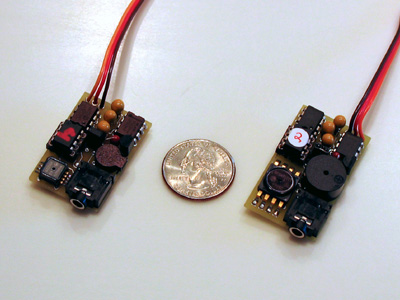
The new smaller version of the RAM altimeter is currently undergoing testing. The new unit (the one on the left) is shown alongside a quarter and one of the older units for size comparison. The new RAM measures 1.5" long x 1" wide and the weight is down to 12 grams. This is 1/4" shorter in length than the older model.
The altimeter firmware will most likely not undergo any more development right now, unless feedback from beta testers warrants it. The next step planned is to add some more features to the FlightView software.
(Update: 3-12-2004)
Overview:
This altimeter has been designed for measuring and recording altitude data
in model aircraft. A complete altimeter package currently consists
of three parts: the altimeter itself, a 10 foot cable to connect the
altimeter to your computer's serial port, and a Windows application used
for viewing and storing flight data on your computer.
For model airplane use, the altimeter plugs into an unused channel on your
receiver for power. When power is turned on to your system, the
altimeter will go through a 2 minute waiting period to allow the
semiconductor pressure sensor to settle. This is unfortunately
unavoidable due to the extremely small pressure variations that the
altimeter is measuring. After this 2 minute period, the altimeter
will beep 3 times to notify you that it is taking data, and you may begin
your flight. Data will continue to be taken until power to the
altimeter is removed. Every time power is re-applied to the
altimeter it will begin storing data under a new flight. This can
continue until the 4-1/2 hours of memory is full. So, for example,
you could have one long 4-1/2 hour flight, or nine 1/2 hour flights, or
eighteen 15 minute flights, etc.
For recreational use, the altimeter may be powered by a standard 9 volt
battery. It may be used to record altitude information on a hike or
a drive to the mountains, etc.
Changes in the works:
Hardware - Smaller versions of the pressure sensor and the beeper
have been found. The PC board layout is currently being changed and
will be smaller in size. The new size will be 1-1/2" long x
1" wide max. The weight of the unit will also decrease.
Firmware - I'd like to add the ability to have the altimeter beep
out the maximum altitude of a flight so that you have that information
right when you land, instead of waiting until you view it on the
computer. For example, if your max altitude was 1312 feet, the
altimeter would announce (beep - pause - beep beep beep - pause - beep -
pause - beep beep). This technique is used on many model rocketry
altimeters and works quite well. I also plan on adding the ability
to turn data collecting on and off via your transmitter.
Software - I plan on adding temperature compensation to the
software. By entering the approximate air temperature at the time of
your flight, the altitude data can be plotted with a higher degree of
accuracy.
Feedback:
If you have any questions or comments, please
contact me at rcbrustee@aol.com.
Altimeter Features
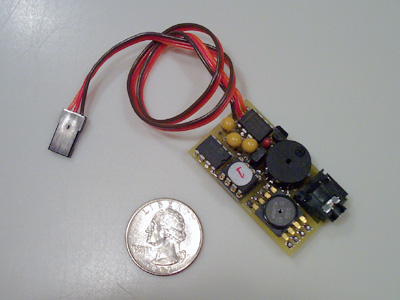
- Size: 1-3/4" long x 1" wide x 1/2" high.
- Weight: 13.5 grams with 12" lead.
- Resolution: < 1 foot.
- Sample Rates: 1 or 5 samples/second, jumper selectable.
- Memory: 4-1/2 hours at the 1 sample/sec. rate.
- Interface: RS-232, cable included.
- Power Supply: 3-1/2 to 10 volts.
- Current Draw: 12 milliamps at 4.8 volts.
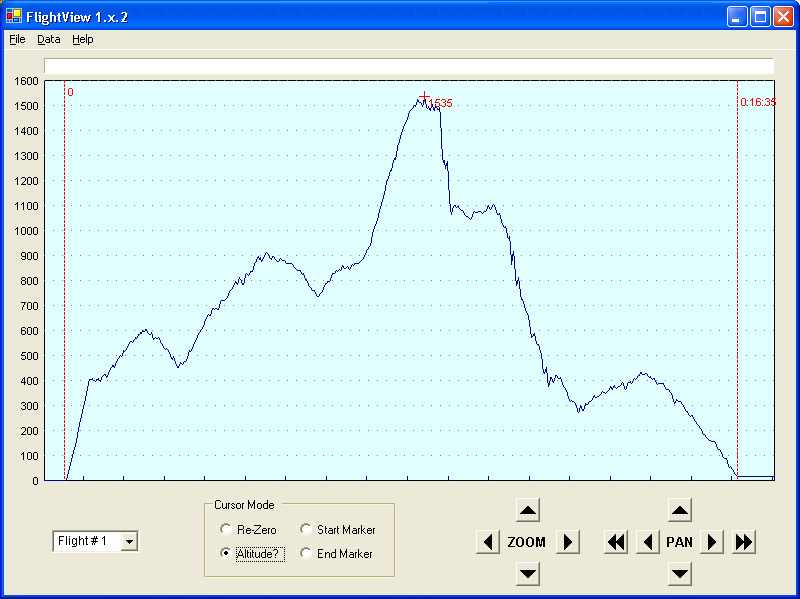
Flight of an Omega 1.8 electric glider,
click on picture to enlarge
FlightView Software Features
- Upload, view, and save flight data.
- Reload and view previously saved flights.
- Zoom and pan both time and altitude.
- Set Start and End markers with mouse.
- Set Altitude marker with mouse.